Note de la rédaction — Ce guide s’adresse aux élèves, enseignants et parents cherchant des jeux gratuits légitimes fonctionnant sur des appareils scolaires gérés et pendant les pauses devoirs à la maison. Cet article traite du contexte éducatif autour des jeux en navigateur, pas des techniques pour contourner les politiques réseau scolaires. Chaque jeu ci-dessous est un titre HTML5 basé sur navigateur testé sur un Chromebook standard avec filtrage de contenu typique activé. Dernière vérification : avril 2026.
Pourquoi ce guide existe (et pourquoi la plupart des listes de « jeux débloqués » déçoivent les élèves)
Si vous avez déjà cherché « jeux débloqués pour l’école », vous avez probablement vu des centaines de sites promettant « 1000+ jeux débloqués » — puis cliqué sur un lien en troisième heure pour voir le même écran « Ce site a été bloqué ». La vérité est plus simple que ce que ces sites admettent :
- La plupart des sites de « jeux débloqués » basés sur des proxies sont ajoutés aux listes de filtrage en quelques jours car des fournisseurs comme Securly, GoGuardian et Lightspeed mettent à jour leurs bases de données de catégories.
- Les jeux qui tournent directement en HTML5 depuis un CDN majeur sont rarement bloqués par défaut — car les bloquer casserait aussi des outils éducatifs légitimes utilisant la même infrastructure (quiz en navigateur, leçons interactives, environnements de codage).
- Ce dont les élèves ont vraiment besoin est une liste de jeux qui (a) fonctionnent dans un navigateur standard, (b) ne nécessitent pas de téléchargement, (c) ne demandent pas d’inscription, et (d) ne sont pas hébergés sur des domaines proxy connus et signalés.
C’est ce que cette liste propose. Chaque jeu ci-dessous a été testé sur un Chromebook avec filtrage réseau standard en classe. Nous expliquerons aussi pourquoi les jeux HTML5 se comportent différemment des sites « débloqués » de l’ère Flash, ce que dit la recherche sur les pauses courtes de jeu pendant les études, et comment enseignants et parents peuvent avoir une conversation plus saine avec les élèves sur le temps d’écran plutôt qu’une approche purement restrictive.
Jouez à n’importe quel jeu ci-dessous →
Qu’est-ce qu’un « jeu débloqué », en fait ? Une explication technique en langage clair
L’expression « jeu débloqué » est largement mal comprise. Les élèves supposent souvent que cela signifie un jeu délibérément caché à l’école, ou une version piratée d’un jeu commercial. En pratique, le terme décrit généralement l’une des trois choses très différentes :
- Des jeux HTML5 légitimes en navigateur qui se chargent via un domaine que le filtre scolaire ne classe pas comme « jeux ». Ils ne contournent rien — ils ne sont simplement pas classés comme trafic de jeu car ils proviennent d’un domaine web généraliste ou d’un CDN (réseau de distribution de contenu) partagé avec des outils éducatifs.
- Des sites proxy ou miroirs qui réhébergent des jeux sur des URL inhabituelles pour passer à travers les listes de blocage basées sur des mots-clés. Ils sont éphémères. Les plateformes de filtrage scolaire comme GoGuardian suivent explicitement et re-bloquent ces domaines proxy dès leur apparition.
- Des alternatives basées sur navigateur à des jeux Flash autrefois populaires, archivés après la fin de Flash en 2020. Ils ont été reconstruits en HTML5 et JavaScript et se chargent nativement dans Chrome, Edge, Safari et Firefox sans plugin.
Ce guide concerne exclusivement les première et troisième catégories — des jeux qui fonctionnent selon les standards web modernes et sont bien tolérés dans les environnements filtrés. Si une école décide de les bloquer spécifiquement, ils seront bloqués. C’est la prérogative de l’école, et cet article ne recommande pas de contourner cette décision.
Pourquoi les jeux HTML5 passent souvent à travers les filtres de contenu
Les filtres scolaires utilisent principalement trois signaux pour décider de bloquer une page :
- Catégorisation d’URL. Chaque domaine est étiqueté par le fournisseur de filtre — « Éducation », « Réseaux sociaux », « Jeux », « Jeux d’argent », etc. Les sites sans signal fort de catégorie sont souvent classés « non catégorisé » plutôt que « bloqué ».
- Analyse de mots-clés. Les filtres recherchent des mots-clés évidents dans les URL, titres de page et métadonnées. « Unblocked-games-666.xyz » est facile à bloquer ; un portail généraliste de jeux avec contenu éducatif et puzzles ressemble plus à un site edutech.
- Inspection de contenu. Les filtres modernes, comme décrit dans la documentation des fournisseurs et guides industriels, utilisent de plus en plus l’apprentissage automatique pour inspecter le contenu même de la page. C’est pourquoi les sites hébergeant des images violentes ou sexuelles sont bloqués rapidement quel que soit le domaine, tandis que les sites de puzzles mathématiques et d’échecs ne le sont généralement pas.
Les jeux HTML5 passent les filtres pour des raisons simples : ils partagent l’infrastructure avec des outils éducatifs légitimes (CDN comme Cloudflare, Amazon CloudFront, Google Cloud), contiennent souvent des contenus de mathématiques, logique ou vocabulaire, et ne déclenchent pas les signaux évidents qui signalent proxies et sites de piratage. Pour un aperçu plus approfondi du fonctionnement pratique du filtrage scolaire et du débat politique autour, voir la page de la Federal Communications Commission sur le Children's Internet Protection Act et le reportage de EdSurge sur les effets secondaires du CIPA.
Un rapide contrôle des données : pourquoi ce sujet importe
Les jeux en navigateur à l’école ne sont pas un comportement marginal. Selon le rapport 2024 du Pew Research Center Teens and Video Games Today, 85 % des adolescents américains déclarent jouer aux jeux vidéo, et 41 % y jouent quotidiennement. La plupart des adolescents interrogés ont dit que le jeu ne nuit pas à leurs résultats scolaires — 72 % n’ont signalé ni impact positif ni négatif sur l’école. Le jeu fait simplement partie de la manière dont la majorité des élèves se détendent, socialisent et prennent des pauses.
Côté recherche, les jeux numériques avec modération sont associés à des effets cognitifs mesurables. Une étude revue par des pairs en 2024 sur les jeux éducatifs numériques et la motivation des élèves a montré que l’apprentissage par le jeu augmentait l’engagement des élèves via des mécanismes bien compris comme les boucles de rétroaction et la fixation d’objectifs. Par ailleurs, une revue systématique sur les micro-pauses et la performance académique a rapporté que des pauses courtes — de l’ordre de 5 à 10 minutes — aidaient les étudiants à maintenir leur concentration plus efficacement que de longues sessions ininterrompues.
La recherche n’est pas un blanc-seing pour le jeu pendant la journée scolaire. Le rapport CDC 2024 sur le temps d’écran des adolescents a constaté que plus de la moitié des adolescents accumulent désormais quatre heures ou plus d’écran par jour, avec des totaux plus élevés corrélés à des troubles du sommeil, anxiété et dépression. Et en 2026, l’American Academy of Pediatrics a publié des recommandations médias révisées qui s’éloignent des limites strictes en minutes quotidiennes au profit d’un « Plan Média Familial » individualisé — priorisant sommeil, activité physique et contexte plutôt que le nombre brut d’heures.
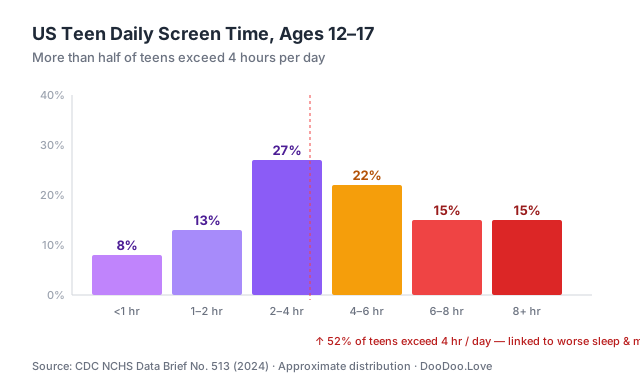 Source: CDC NCHS Data Brief No. 513 (2024). Distribution approximate.
En résumé, le constat n’est pas « les jeux sont mauvais » ni « les jeux sont excellents ». C’est que des pauses courtes et bien choisies sont compatibles avec l’apprentissage, tandis que un temps d’écran passif prolongé ne l’est pas. Ce guide est organisé autour de cette distinction.
Jeux pour pauses courtes vs jeux pour sessions longues : deux usages différents
L’un des cadres les plus utiles qu’un élève, enseignant ou parent peut adopter est de séparer les jeux en navigateur en deux catégories :
| Catégorie | Durée de session | But | Exemples | |---|---|---|---| | Jeux pour pauses courtes | 3–10 minutes | Remise à zéro mentale entre tâches, transition entre cours, détente après un devoir | 2048, Sudoku, Solitaire, Mahjong | | Jeux pour sessions longues | 30+ minutes | Divertissement pendant étude libre, temps libre en bibliothèque, déjeuner ou après l’école | Tower Defense, Échecs contre IA, jeux de stratégie et .io |
Les jeux pour pauses courtes sont ceux qui ont leur place dans un contexte académique. Ils se chargent en quelques secondes, se mettent en pause proprement, et sont conçus autour de petites boucles gratifiantes qui s’intègrent naturellement dans une fenêtre de 5 minutes entre tâches. Les jeux pour sessions longues sont valides et plaisants, mais moins adaptés comme « pause rapide » car leur durée naturelle est bien plus longue.
Le reste de ce guide répartit les 15 titres recommandés selon cette distinction.
Jeux de puzzle à jeu rapide (parfaits pour pauses de 5 minutes)
Ces jeux se chargent en moins de 3 secondes et peuvent être mis en pause instantanément. Ce sont les meilleurs candidats pour des pauses d’étude structurées pendant le travail indépendant ou entre des exercices à la maison.
1. 2048 (édition Bubble Merge)
Le classique puzzle de fusion de nombres qui a inspiré des milliers d’imitateurs. Faites glisser les tuiles pour combiner des nombres identiques et atteindre la tuile 2048. Chaque session peut durer 2 minutes ou 30 minutes selon votre implication.
Pourquoi ça marche comme pause d’étude : Pas besoin de son, pas d’animations flashy, et un état de sauvegarde naturel qui permet d’arrêter sur un coup propre. Le gameplay est mathématique — pure arithmétique en base 2 — donc c’est aussi un exercice léger de nombres.
Jouer à Bubble Merge 2048 pendant des heures était un plaisir, mon meilleur score personnel de 8192 reste une réussite. J’ai constaté que me concentrer sur la création d’une bulle à haute valeur puis la fusionner avec d’autres aide beaucoup. Le jeu devient difficile vers le niveau 10, où le nombre de bulles augmente drastiquement, rendant la planification difficile. J’ai eu du mal à dépasser ce point, mais avec de la persévérance, j’ai réussi à surmonter le défi et atteindre un score plus élevé, rendant l’expérience encore plus satisfaisante.
2. Sudoku
Probablement le jeu le plus « scolaire » jamais inventé — utilisé littéralement en cours de maths. La version navigateur se charge instantanément et supporte la saisie au clavier.
Pourquoi ça marche comme pause d’étude : Sudoku est largement classé comme outil éducatif et figure sur les listes de puzzles logiques recommandées par Common Sense Education. Le modèle mental — possibilités réduites par élimination — se transfère directement à l’algèbre et aux mathématiques basées sur la démonstration.
Sudoku Deluxe a été mon jeu de puzzle favori pendant des heures, avec un meilleur score personnel de 247 points au niveau moyen. J’ai constaté que me concentrer sur une ligne ou une colonne à la fois aide les nouveaux joueurs comme je l’étais au début. Le niveau difficile a été un vrai défi, demandant plus de réflexion stratégique. Après plusieurs heures, j’ai pu surmonter cet obstacle et améliorer significativement mes scores.
3. Solitaire (Card Sort Puzzle)
Tout le monde connaît le Solitaire. Cette version navigateur se charge plus vite que celle de Windows et ne contient pas de publicités pendant le jeu.
En jouant à Solitaire Card Sort Puzzle pendant des heures, j’ai atteint un meilleur score personnel de 2150 points, obtenu en me concentrant sur le tri rapide des cartes par couleur. Ma stratégie était de vider une couleur à la fois pour éviter la confusion. J’ai rencontré des difficultés quand le plateau s’est encombré de plusieurs couleurs, mais j’ai surmonté cela en priorisant les couleurs avec le plus de cartes. Trier les cartes par couleur pour vider le plateau demande patience et attention, et j’ai trouvé que rester concentré était la clé pour battre mes scores précédents.
4. Mahjong Connect Classic
Associez des paires de tuiles avant que le temps ne s’écoule. Plus engageant que les jeux d’association basiques, mais suffisamment peu risqué pour jouer pendant une pause sans perdre la concentration pour la suite de la session d’étude.
En jouant à Mahjong Connect Classic pendant des heures, j’ai atteint un meilleur score personnel de 25 600 points, obtenu après avoir maîtrisé l’art de la planification. Ma stratégie consiste à libérer d’abord les tuiles du milieu, ce qui aide les nouveaux joueurs à créer plus de connexions ensuite. La difficulté a augmenté lorsque j’ai rencontré un plateau avec peu d’options, m’obligeant à penser plusieurs coups à l’avance pour ne pas rester bloqué, mais avec de la persévérance, j’ai réussi à surmonter ce défi.
5. Draw Save Puzzles
Un puzzle physique récent où vous dessinez des lignes pour sauver un personnage du danger. Jeu à une main (juste une souris), chaque niveau prend moins d’une minute — la structure idéale « un niveau et retour au travail ».
Après plusieurs heures à jouer à Draw Save Puzzles, mon meilleur score personnel est de 42 niveaux terminés sans aucune perte de Stickman. J’ai constaté que dessiner des pentes douces aide à guider Stickman en sécurité plus efficacement. Le moteur physique du jeu peut être impitoyable, surtout au niveau 27, où j’ai rencontré un puzzle difficile nécessitant un dessin précis des formes pour réussir. Ce niveau m’a demandé plusieurs tentatives, mais la sensation d’accomplissement était gratifiante.
Jeux d’action et de réflexe (pour les périodes libres plus longues et après l’école)
Ces jeux conviennent mieux aux études libres, temps libre en bibliothèque, pauses déjeuner ou temps libre à la maison qu’aux micro-pauses en classe. Ils récompensent les sessions longues et bénéficient d’une concentration soutenue.
6. Slope (variante Car Gradient)
Le jeu infini de roulage de balle dans un tunnel devenu légendaire en classe. Cette version contrôle une voiture au lieu d’une balle — même adrénaline, physique différente.
Pourquoi ça marche en périodes libres : Le fichier du jeu est relativement petit (~2 Mo) donc il se charge même sur un Wi-Fi scolaire instable, et l’état d’échec se réinitialise instantanément, donc une session de 10 minutes produit de nombreuses tentatives complètes.
Jouer à Slope Car Gradient pendant des heures était une aventure, mon meilleur score personnel est de 857 mètres. Pour éviter les obstacles, j’ai trouvé que freiner au bon moment aide les nouveaux joueurs. Le jeu devient difficile vers 500 mètres, où la piste se rétrécit et les obstacles se rapprochent, j’ai eu du mal à maintenir la vitesse sans crash. Après un peu d’entraînement, mes réflexes se sont améliorés et j’ai battu mes records, maintenant je vise les 1000 mètres.
7. Pac-Man (HTML5)
Un clone de Pac-Man basé sur navigateur qui reste fidèle à l’original. Flèches pour se déplacer, pas de téléchargement, pas de Flash.
Jouer à Pac-Man HTML5 pendant des heures était un plaisir, mon meilleur score personnel est de 24 310 points. Pour passer les niveaux, j’ai trouvé que manger les fruits en premier aide beaucoup. Le jeu devient difficile vers le niveau 20, où les fantômes deviennent très rapides, et j’ai eu du mal à survivre. Un conseil qui m’a aidé : toujours garder un œil sur Blinky, le fantôme rouge, car il me poursuit le plus.
8. Tetris (édition Pixel Drift Retro)
Un autre classique « pourquoi quelqu’un bloquerait ça ? ». La variante rétro a le gameplay exact des blocs tombants que chaque prof a joué sur sa Game Boy.
Jouer à Pixel Drift Retro Tetris pendant des heures était un plaisir, mon meilleur score personnel de 23 750 tient toujours. J’ai constaté que nettoyer plusieurs lignes à la fois aide les nouveaux joueurs à accumuler rapidement des points. Le défi est vraiment arrivé sur la troisième carte, où la vitesse d’apparition des pièces a augmenté drastiquement. J’ai eu du mal à suivre, mais j’ai réussi à m’adapter et à surmonter, maintenant je vise à débloquer la sixième carte.
9. Flappy Pumpkin
Le cousin d’Halloween de Flappy Bird. Le contrôle à un bouton (espace ou clic) permet de jouer à une main.
Flappy Pumpkin est devenu mon jeu préféré pendant des heures, et mon meilleur score personnel est de 217 médailles collectées. Pour éviter ces mains poppy robotiques agaçantes, j’ai trouvé que tapoter en courtes rafales aide à garder le contrôle. Le défi monte vite, surtout vers 150 médailles, où les mains bougent plus vite. J’ai eu du mal à dépasser ce point, mais avec de l’entraînement, j’ai réussi, et maintenant je suis accro à battre mon propre score.
Jeux de stratégie et de réflexion (pour un réel apprentissage)
Ce sont les jeux que les enseignants tolèrent souvent — car ils comptent comme entraînement cérébral et correspondent aux bénéfices cognitifs décrits dans la recherche sur les jeux numériques et l’engagement dans l’apprentissage.
10. Échecs (Gratuit)
Jouez contre l’IA ou en mode « hot-seat » avec un ami. Les échecs figurent sur la plupart des listes blanches scolaires car les clubs d’échecs existent, et c’est un des exemples les plus clairs de jeu avec une valeur cognitive transférable — la recherche associe régulièrement les échecs à des gains en planification, reconnaissance de motifs et mémoire de travail.
Jouer aux Échecs Gratuit pendant des heures, j’ai réussi à battre l’IA au niveau 12 avec un score de 23 coups. Ma clé du succès était de contrôler le centre de l’échiquier, que j’ai remarqué que les nouveaux joueurs négligent souvent. Au niveau 14, j’ai rencontré un défi difficile, mais la fonction annuler m’a aidé à expérimenter différents coups. J’ai trouvé que prendre mon temps et planifier était crucial, surtout quand l’IA a commencé à mettre la pression.
11. Tower Defense (Terrifying Zombies II)
Les jeux de placement stratégique sont sournoisement éducatifs — gestion des ressources, raisonnement spatial, planification. Le thème « zombies terrifiants » est léger (dessin animé, pas effrayant).
Terrifying Zombies Tower Defense II m’a captivé pendant des heures, construisant des défenses et tirant sur des zombies pour gagner de l’XP. Mon meilleur score personnel est de 12 500 points au niveau 5. J’ai constaté que placer les tours près des goulots d’étranglement aide les nouveaux joueurs à économiser les ressources. En progressant, j’ai rencontré un défi au niveau 7, où la vitesse des zombies a augmenté significativement. Pour surmonter cela, je me suis concentré sur l’amélioration de ma tour fusil à pompe, ce qui a fait une grande différence pour éliminer les zombies plus rapides.
12. Riddlemath
Un jeu de puzzle mathématique qui présente les équations sous forme d’énigmes. Utile pour réviser l’algèbre au collège.
Pourquoi ça marche en contexte scolaire : C’est littéralement un jeu de maths. Les problèmes d’arithmétique et d’ordre des opérations sont présentés comme des puzzles, ce qui est exactement le type d’exercice à faible enjeu que les méta-analyses sur l’apprentissage par le jeu associent à de petites mais constantes améliorations de l’engagement.
Jouer à RiddleMath pendant des heures a été un exercice cérébral, mon meilleur score personnel est de 250 points d’affilée sans erreur. J’ai constaté que prendre mon temps pour lire attentivement les questions aide les nouveaux joueurs à éviter les erreurs bêtes. Le niveau moyen a été un défi, notamment les puzzles logiques demandant de penser différemment. Commencer par des énigmes simples puis passer aux plus difficiles a facilité la progression.
13. Quiz de géographie : pays, drapeaux, capitales
Identification des drapeaux et correspondance des pays. Plus difficile qu’il n’y paraît — essayez d’obtenir 100 % sur la section Afrique.
Jouer au Quiz de géographie pendant des heures a été passionnant, mon meilleur score personnel est de 87 bonnes réponses consécutives. Pour progresser, j’ai trouvé utile de commencer par des questions plus faciles sur les drapeaux. La partie difficile était de retenir les capitales des petits pays, ce qui m’a souvent piégé. Ma stratégie est de me concentrer sur une région à la fois, maîtrisant ses pays et capitales avant de passer à la suivante. Après un moment, j’ai eu du mal avec les pays africains, mais avec de la persévérance, j’ai surmonté cette difficulté.
14. Quiz de culture générale
Quiz multi-catégories allant de la pop culture à la science. Idéal pour jouer en groupe pendant l’étude libre.
Jouer au Quiz de culture générale pendant des heures était un plaisir, mon meilleur score personnel est de 420 points. J’ai constaté que me concentrer sur la catégorie histoire m’a aidé à augmenter mon score. Une partie difficile était les questions de science, elles sont devenues vraiment dures. Pour surmonter cela, j’ai commencé à utiliser le processus d’élimination pour deviner les bonnes réponses. Cette stratégie a bien fonctionné, et j’ai pu augmenter mon score de cent points, maintenant je vise 500.
Jouer au Quiz de culture générale →
Jeux sociaux / multijoueur (jouez avec des amis dans différentes classes)
15. Boxer.io
Un jeu de boxe .io basé sur navigateur. Parties courtes (90 secondes), réapparition rapide.
Jouer à Boxer.io pendant des heures était intense, mon meilleur score personnel est de 2500 points après une session de 10 minutes. Pour monter dans les classements, j’ai trouvé que me concentrer sur l’absorption des orbes de puissance tout en esquivant les adversaires plus gros est la clé. Un défi difficile a été de me faire écraser par un joueur géant, mais j’ai appris à rester agile et à cibler d’abord les plus petits. Ma stratégie est de commencer par éliminer les cibles faciles pour augmenter ma taille et ma force avant d’affronter les plus gros.
Comment vérifier réellement si un jeu se charge sur votre appareil scolaire
Avant de passer 5 minutes au labo informatique de l’école pour voir « bloqué », un élève peut faire un auto-test rapide :
- Vérifiez le domaine. Les jeux sur DooDoo.Love se chargent depuis
doodoo.love(notre domaine principal) ethtml5.gamemonetize.com(notre CDN de jeux). Si l’un de ces deux charge, les jeux de cette liste fonctionnent. - Testez pendant une période libre, pas en cours. Si un jeu est bloqué, le bon moment pour le découvrir est pendant un temps indépendant, pas en algèbre.
- Respectez la politique réseau. Les filtres scolaires existent pour de bonnes raisons — conformité CIPA, sécurité des élèves, gestion de la bande passante. Si un jeu est bloqué sur un réseau spécifique, il est bloqué. Ce guide n’est pas un contournement.
Cet article ne recommande pas d’utiliser des proxies, VPN ou sites de « déblocage scolaire ». Ils violent la plupart des politiques d’utilisation acceptable, et se faire prendre entraîne généralement la perte des privilèges sur l’appareil — pire que de simplement garder un jeu pour après l’école.
Une conversation plus saine : comment enseignants et parents peuvent parler aux élèves des pauses jeu
Le cadre « jeux contre école » est souvent contre-productif. Les élèves jouent en grand nombre quel que soit le souhait des adultes (voir les chiffres 85 % et 41 % ci-dessus), donc la conversation utile porte sur quand et combien de temps plutôt que si.
Quelques points concrets qui fonctionnent mieux que des règles générales :
- Ancrez les pauses sur la fin du travail, pas sur des minuteries. « Finis cette fiche, puis prends une pause de 5 minutes » est plus facile à respecter que « 15 minutes d’écran par heure ». Cela fait du jeu un signal de récompense pour le travail accompli plutôt qu’un compte à rebours vers un conflit.
- Nommez explicitement la catégorie. Les élèves répondent bien à la distinction entre « jeu pour pause rapide » et « jeu pour session longue ». La plupart des frictions autour du jeu en classe viennent de sessions longues tentées dans des fenêtres de pause.
- **Concentrez-vous sur le sommeil, pas les