Games to Play When Bored at School (That Actually Work on School Wi-Fi)
Everyone knows the feeling: a student sits in a dull class, eyes glazed over, and the clock somehow refuses to move. The Wi-Fi is slow, restrictive, and most gaming sites are blocked, leaving the student desperate for something to do without lagging out or disturbing anyone around them. There is, however, a useful middle ground — a category of browser games that load quickly on restrictive networks, look harmless on a shared screen, and serve as short mental breaks rather than time-sinks. This guide walks through that category carefully, with an eye toward healthy break habits rather than rule-breaking, and it leans on established research about attention, boredom, and casual game play to explain why short, structured breaks often help students return to work more focused than before.
Why Classroom Boredom Happens (And Why It Matters)
Boredom at school is not a character flaw. It is a well-studied cognitive state. Researchers in educational psychology describe boredom as a signal that the current task is perceived as either too easy, too difficult, or insufficiently meaningful, and the mind responds by looking for alternative stimulation. One of the most common alternatives is mind-wandering — letting attention drift away from the lesson even while the body stays in the seat. Studies summarized by the Frontiers in Psychology journal note that mind-wandering is best understood as an exploratory response to boredom, especially when a change in activity is not possible. See the open-access review "Mind wandering and education: from the classroom to online learning" for a detailed discussion.
The numbers are striking. Across daily life, the human mind wanders during roughly 30 to 50 percent of waking hours. Inside classrooms specifically, researchers using experience-sampling probes have found that students report task-unrelated thoughts in response to about 33 percent of in-class probes, and that rate climbs as a lecture goes on — from around 25 percent at the start to roughly 44 percent by the end. A widely cited attention-decline study also documented that initial breaks in attention occur after about 10 to 18 minutes of lecture, with attention lapses becoming more frequent (every 3 to 4 minutes) toward the end. Those findings are captured in the review "Everyday attention and lecture retention: the effects of time, fidgeting, and mind wandering".
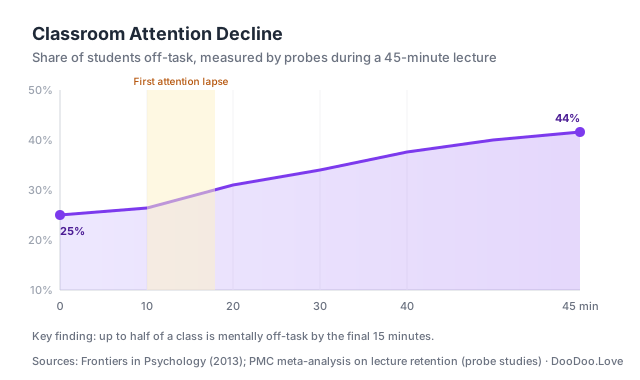 Sources: Frontiers in Psychology — Mind wandering and education (2013) · PMC — Everyday attention and lecture retention
The practical takeaway is not that students should try to eliminate boredom — they cannot — but that they should plan what to do with it. A deliberate, short mental reset during a genuine free period or break tends to be less disruptive than the slow drift of inattention that otherwise fills those minutes. That is where quick browser games can earn their place, if they are chosen with care.
The Golden Rule: Browser Games That Fly Under the Radar
When dealing with school Wi-Fi, the practical rule is simple: stick to lightweight, browser-based games that do not scream "gaming" at first glance. Games running on minimal data, no heavy scripts, and simple graphics tend to be the best fit. They load fast, rarely trigger network filters, and often resemble "educational" or "puzzle" activities, which makes them less likely to be blocked in the first place.
Games that rely on HTML5 or minimal JavaScript tend to be more stable on restrictive networks. Flash-based or multiplayer-heavy games are usually a dead end, because they either will not load or will flag the connection. Another underrated factor is URL design — some games sit on subdomains and paths that do not explicitly say "game," which tends to slide past keyword-based filters. That is one reason DooDoo.Love organizes its catalog around short, clean paths.
The more important filter, though, is the kind of game itself. Short puzzle games, card games, and quiz-style formats fit the 5 to 15 minute window in which a break can actually help. Anything that demands a 30-minute run or a login-based progression system is a poor fit for school downtime, because it either invites interruption at the wrong moment or pulls the student past the healthy limit of a short mental pause.
The 5-Minute vs. 15-Minute Game Rule
Not every "short game" is really short. A useful distinction for school settings is between two tiers: the 5-minute reset and the 15-minute deep break.
A 5-minute reset game has a single, self-contained loop. One round is one round. The student can close the tab mid-sentence without losing progress. Examples in the list below include 2048, Flappy Pumpkin, and Memory Match. These are well suited to the brief window between two classes or the last few minutes after finishing an assignment. The research on casual game play supports this approach: in the controlled study "Searching for Affective and Cognitive Restoration: Examining the Restorative Effects of Casual Video Game Play", participants who played a casual video game for under ten minutes showed measurable mood restoration and reported higher engagement than those in a passive relaxation condition. Short is often enough.
A 15-minute deep break game has more structure — a Sudoku board, a Solitaire deal, a chess puzzle — and gives the brain something meatier to chew on. These games are appropriate for a genuine study-hall period or a full lunch break, not the last minute of class. Attempting to "squeeze in" a 15-minute game when only 4 minutes remain is exactly the habit that makes gaming feel like stolen time rather than a mental pause. The 5 vs 15 distinction is the single most useful rule of thumb for deciding which game to open in which situation.
This also dovetails with structured break techniques popular in student productivity circles. The Pomodoro technique, for example, pairs a 25-minute focus interval with a 5-minute break. Research summarized in the British Journal of Educational Psychology study "Understanding effort regulation: Comparing 'Pomodoro' breaks and self-regulated breaks" found that students taking pre-determined, systematic breaks reported better mood and similar task completion in shorter time compared to students who let themselves drift into self-regulated breaks. The lesson: a planned 5-minute game after 25 minutes of study is very different from an open-ended, "just one more round" session.
Quick Puzzle Games
Play 2048 →
The classic numbers sliding puzzle never gets old. 2048 is deceptively simple: combine matching tiles to reach the elusive 2048 tile. It loads instantly, requires zero network resources once loaded, and the gameplay is fast enough to keep a player hooked without drawing attention. A useful tip: aiming for smaller merges early on helps keep the board manageable and scores climbing steadily. Because the game saves its state in the browser, a student can close the tab the moment a teacher starts speaking and pick up exactly where they left off later.
Play Sudoku →
Sudoku is a timeless schoolyard favorite, and this clean, browser-based version is no different. It is well suited for exercising the brain during a long, quiet period. The interface is minimal, so it reads more like a note-taking app than a game. Pro tip: use pencil marks discreetly by toggling the note mode — it keeps the mind sharp and the moves calculated. Sudoku is a classic 15-minute deep-break game; avoid starting a new puzzle if less than ten minutes remain.
Play Solitaire →
Nothing beats the soothing shuffle and stack of Solitaire. This version runs smoothly on most Wi-Fi networks, with classic Klondike rules that feel oddly meditative. Keeping a folder of open study tabs handy makes it easy to alt-tab quickly if the situation changes. The simpler the interface, the less attention it draws from anyone glancing over a shoulder.
Play Draw Save Puzzles →
For puzzles that require a bit of creativity, this game has it covered. It combines logic and drawing — the player solves puzzles by marking paths or shapes. It is close enough to an educational activity that it rarely looks out of place, and the quick load time means a student can jump in between classes without waiting on a slow network.
Play Number Quest →
Number Quest is a blend of puzzle and strategy, where the player connects numbers that add up to targets. It is challenging enough to stay engaging but light enough to load on restricted networks. The gameplay is turn-based and calm, which is perfect for killing time without the stress of frantic clicking — and calm pacing is part of why casual puzzle games show up so often in the stress-reduction literature.
Action Games That Load Fast
Play Slope →
Slope is deceptively simple but wildly addictive. The player controls a rolling ball barreling down a 3D slope, dodging gaps and obstacles. It is minimalistic, and the low-poly graphics mean it loads lightning-fast. A note of caution: Slope is engaging enough to push past a 5-minute window, so it is best reserved for a clearly defined free period rather than the final minutes before a lesson restarts.
Play Pac-Man →
Classic enough to pass as a retro gaming artifact, Pac-Man's HTML5 version runs smoothly even on cramped school Wi-Fi. It is well suited to quick bursts of action, and the maze-chase gameplay is timeless. Some schools even allow it thanks to its historic significance in gaming and computer science curricula.
Play Flappy Pumpkin →
Flappy Pumpkin twists the Flappy Bird formula into a Halloween-themed challenge. It is simple: tap to keep the pumpkin afloat through gaps. The controls are easy, the game lightweight, and it offers just the right amount of frustration to be engaging without being distracting. This is a textbook 5-minute reset: one run rarely lasts more than a minute.
Play Tetris →
Tetris is the quintessential action-puzzle hybrid with minimal graphics and zero lag. It is perfect for a controlled break because it is quick to start and can be paused instantly. Keeping an eye on the "next piece" is a small discipline that tends to raise scores quickly and is part of the reason Tetris has endured as a study-break staple for decades.
Play Stickman Duel Battle →
For something a bit more combative but still lightweight, Stickman Duel Battle delivers punchy, simple battles. The stickman animations are minimalist, so the game loads fast and does not shout "game time" on a shared screen. The controls are intuitive, which means a student can jump in and out without much of a learning curve.
Games Teachers Actually Approve Of
Play Chess →
Chess is the classic strategy game that doubles as a brain booster. This version is clean and straightforward, and because of its association with critical thinking, it is one of the few browser games that many teachers will nod approvingly at if they see it on screen. Solo play and AI opponents load quickly and respect the time between classes.
Play Geography Quiz →
This quiz challenges the player on countries, flags, and capitals. It is openly educational and, in many districts, is unlikely to be blocked by content filters for precisely that reason.
Play RiddleMath →
RiddleMath combines riddles with quick math puzzles — a useful combination for staying sharp during a slow period. It is subtle enough to pass as "brain training," which makes it a sensible choice during school hours.
Play Trivia Quiz →
Trivia Quiz offers a range of topics that challenge general knowledge. It is ideal for quick breaks and works as a conversation starter with classmates or teachers. Because it is educational, it is generally allowed on school networks.
Play Memory Match →
Memory Match trains attention and memory with a simple card-pairing game. It loads quickly and is subtle enough that most teachers will not object to a student sharpening cognitive skills during genuine downtime.
The Cognitive Reset: Why a Short Game Can Actually Help
One of the more interesting findings in the casual-game research literature is that a very short session — under ten minutes — is often enough to restore mood and re-engage attention. The earlier-cited "Searching for Affective and Cognitive Restoration" study found that a brief casual video game produced more affective restoration than a guided relaxation condition of the same length. A separate systematic review, "The Effects of Casual Videogames on Anxiety, Depression, Stress, and Low Mood", pulls together multiple studies showing that casual game play is associated with reductions in acute stress and improvements in low mood, especially when sessions are short and the games are simple and non-violent.
Why might that be? Psychologists point to two mechanisms. First, a casual game demands just enough attention to pull the player out of a ruminative loop — the "I am bored and now I am thinking about being bored" spiral — without requiring the cognitive effort of a complex task. Second, the clear win/lose feedback of a puzzle or arcade round delivers small, frequent success signals, which nudges mood upward on a short timescale. The combination is what researchers mean when they call casual games "restorative": not a cure for stress, but a quick reset.
This also connects to a larger idea from chronobiology: the ultradian rhythm. Work by sleep researcher Nathaniel Kleitman and more recent meta-analyses suggest that human attention naturally cycles in roughly 90-minute arcs, with focus rising in the first hour and dipping in the final 20 minutes. Many productivity writers now recommend working in blocks that align with that rhythm, with a short break in between. A five-minute browser game is a plausible form of that break — more active than scrolling a feed, less draining than another app-switching session, and (importantly) bounded by the end of the round.
Average mobile and browser gaming sessions are shorter than most people assume. According to aggregated global data in Statista's "How Long Do Mobile Gamers Play on Average?" chart, the median mobile session runs roughly 5 to 6 minutes, with top-performing games averaging 8 to 9 minutes. In other words, the "school-appropriate" session length and the "globally typical" session length are much closer than many students realize. A well-placed five-minute round is not deviant behavior; it is within the norm for how the average person uses quick games.
How to Avoid the "Played-Out" Feeling
Short breaks help. Long, unstructured stretches of stacked mini-games do not — and any student who has played through a full study hall only to feel more tired at the end knows the pattern. A few habits keep a break restorative rather than draining:
- Set a one-round rule. Decide in advance whether the break is "one round of 2048" or "one puzzle of Sudoku," and actually stop at the end of that round. This is the same idea behind systematic break research: a bounded break helps more than an open-ended one.
- Avoid stacking games. Jumping from Slope to Tetris to Flappy Pumpkin in a single sitting tends to produce the opposite of restoration — a kind of low-grade cognitive fatigue that carries into the next class. One game per break is enough.
- Respect the 15-minute ceiling. In the casual-game literature, most restorative effects plateau well before 15 minutes. Beyond that, sessions tend to feel less like a reset and more like procrastination.
- Use a visible timer. A small timer on the corner of the screen — or simply a glance at the clock at the start of the round — prevents time from slipping away. Many students who complain about "losing an hour" in a browser game never actually intended to play that long.
- End on a small win. Closing the tab after a successful round leaves the player with a positive feedback signal. Closing it mid-loss leaves a residue of frustration. This is a small trick, but it meaningfully changes how the next block of study feels.
School-Compliant Choices: Quiet, Quick, and Not Disruptive
The deeper cousin article in this series — Best Unblocked Games for School — focuses on Chromebook testing and which titles slip past which filters. This article takes a different angle: what makes a game socially and academically "compliant" in a classroom, even when it is technically available on the network.
Three practical criteria:
- Silent by default. The game should be fully playable with sound muted. Headphones are a reasonable fallback, but a browser game that loses nothing when silenced is simply less disruptive to the room.
- No persistent notifications or pop-ups. Free browser game sites vary widely here. The best ones for a school context do not flash modal ads, autoplay videos, or push browser notifications.
- Graceful pause. The game should survive a sudden alt-tab. Games that hard-fail a run when the tab loses focus are poor fits for any shared space, because they encourage the student to keep the tab in front even when the situation changes.
Most games in the lists above meet all three criteria. Sudoku, Solitaire, Chess, Memory Match, and the quiz titles are the safest bets for environments where appearances matter. Slope and Flappy Pumpkin are fine in a designated free period but less appropriate mid-lecture.
Pro Tips: Using Breaks Wisely Without Getting in the Way of Learning
Gaming at school is not about rebellion — it is about managing boredom without disrupting an education. The single most useful habit is to prioritize classwork first and treat these games as tools for genuine breaks, free periods, or the end of a finished assignment. Keeping a browser game in a small, clearly secondary tab, using headphones when sound is on, and avoiding fullscreen mode together add up to a low-friction break that does not call attention to itself. Picking games that load fast and look innocuous to anyone glancing at the screen — puzzle and educational titles especially — is the simplest path. The underlying principle is not stealth; it is that short breaks should support the rest of the day rather than compete with it.
FAQ
Q: Can these games really bypass school Wi-Fi restrictions? A: Many are hosted on domains or subdomains that are not flagged as gaming sites, and their lightweight design helps them load on restrictive networks. However, some schools block any non-educational content outright, and that is a reasonable policy to respect.
Q: Are these games suitable for quick play or longer sessions? A: Mostly quick play — designed for 5 to 15 minute breaks. Puzzle and quiz games can be played longer during free periods, but most of the mood and focus benefits from casual game play appear in sessions under ten minutes.
Q: Do these games work on mobile devices? A: Yes. Most are HTML5-based and responsive, so they run well on smartphones and tablets connected to school Wi-Fi.
Q: Is playing games at school ethical? A: Gaming should never interrupt learning. When used responsibly during genuine free time or breaks, short casual games can be a healthy way to refresh attention and mood.
Q: What is a "good" length for a school game break? A: Roughly 5 minutes for a quick reset between tasks, up to 10 to 15 minutes for a genuine study-hall break. Beyond that, most of the restorative effect fades and the session starts to feel like procrastination instead of recovery.
Q: Why does a short game feel better than just scrolling a feed? A: Casual games tend to produce a clear start-to-finish loop and frequent small wins, which the research associates with affective restoration. Open-ended scrolling does not offer the same structure, which is part of why it often leaves users feeling drained rather than refreshed.
For a broader selection, check out our Best Unblocked Games for School.
Related guides
Pair this article with the rest of our 2026 gaming pillars:
- 50 Best Free Online Games in 2026 — Our overall top ranking.
- Best 2-Player Browser Games in 2026 — Play with a friend at the next desk.
- Best Unblocked Games for School in 2026 — Deeper Chromebook testing notes.
- .io Games Explained — How the .io genre works and the best ones to try.
Author: DooDoo Editorial