Editor's note — This guide is written for students, teachers, and parents looking for legitimate free games that work on managed school devices and during homework breaks at home. This article discusses the educational context around browser games, not techniques for bypassing school network policies. Every game below is a browser-based HTML5 title that runs in a standard browser tab with no download and no sign-up. July 2026 update: ahead of the 2026–27 back-to-school season, ten picks from the April edition were retired and replaced with equivalents from our actively maintained catalog, screened against the same criteria (HTML5-only, no install, school-appropriate themes). Last verified: July 2026.
Why this guide exists (and why most "unblocked games" lists fail students)
If you have ever searched "unblocked games for school," you have probably seen hundreds of sites promising "1000+ unblocked games" — and then clicked a link in third period only to see the same "This site has been blocked" screen. The truth is simpler than those sites admit:
- Most proxy-based "unblocked games" sites get added to filter lists within days as vendors like Securly, GoGuardian, and Lightspeed update their category databases.
- Games that run directly in HTML5 from a major CDN rarely get blocked by default — because blocking them would also break legitimate educational tools that use the same infrastructure (browser-based quizzes, interactive lessons, coding sandboxes).
- What students actually need is a list of games that (a) run in a standard browser, (b) don't require downloads, (c) don't ask for sign-ups, and (d) aren't hosted on known-flagged proxy domains.
That's what this list is. The returning picks were tested on a Chromebook with standard classroom network filtering; the titles added in the July 2026 refresh were screened against the same requirements before inclusion. We will also walk through why HTML5 games behave differently from legacy Flash-era "unblocked" sites, what the research says about short gaming breaks during study time, and how teachers and parents can have a healthier conversation with students about screen time instead of a purely restrictive one.
What is an "unblocked game," actually? A plain-language technical explanation
The phrase "unblocked game" is widely misunderstood. Students often assume it means a game that has been deliberately hidden from the school, or a pirated version of something commercial. In practice, the term usually describes one of three very different things:
- Legitimate HTML5 browser games that happen to load through a domain the school filter does not categorize as "games." These are not bypassing anything — they simply aren't classified as game traffic because they run from a general-purpose web domain or a CDN (content delivery network) shared with educational tooling.
- Proxy or mirror sites that rehost games on unusual URLs to slip through keyword-based blocklists. These are short-lived. School filtering platforms like GoGuardian explicitly track and re-block proxy domains as they appear.
- Browser-based alternatives to once-popular Flash games that were archived after Adobe Flash was discontinued in 2020. These have been rebuilt in HTML5 and JavaScript and load natively in Chrome, Edge, Safari, and Firefox with no plugin required.
This guide is exclusively about the first and third category — games that run on modern web standards and happen to be well-behaved in filtered environments. If a school chooses to block them specifically, they will be blocked. That is the school's prerogative, and this article does not recommend circumventing that decision.
Why HTML5 games often pass through content filters
School filters mostly use three signals to decide whether to block a page:
- URL categorization. Each domain is labeled by the filter vendor — "Education," "Social Media," "Games," "Gambling," and so on. Sites with no strong category signal often default to "uncategorized" rather than "blocked."
- Keyword scanning. Filters look for obvious signal words in URLs, page titles, and metadata. "Unblocked-games-666.xyz" is an easy block; a general-purpose gaming portal with educational and puzzle content often reads more like an edutech site.
- Content inspection. Modern filters, as described in vendor documentation and industry guides, increasingly use machine learning to inspect page content itself. This is why sites hosting violent or sexual imagery get blocked quickly regardless of domain, while math-puzzle and chess sites typically do not.
HTML5 browser games tend to pass filters for mundane reasons: they share infrastructure with legitimate educational tools (both use CDNs like Cloudflare, Amazon CloudFront, and Google Cloud), they often contain math, logic, or vocabulary content, and they don't trigger the obvious signals that flag proxies and piracy sites. For a deeper overview of how school filtering works in practice and the policy debate around it, see the Federal Communications Commission's Children's Internet Protection Act page and reporting from EdSurge on CIPA's side effects.
A quick data check: why this topic matters
Browser games at school are not a fringe behavior. According to Pew Research Center's 2024 report Teens and Video Games Today, 85% of U.S. teens say they play video games, and 41% play them daily. Most teens in the survey said gaming does not hurt their academic performance — 72% reported neither a positive nor a negative impact on school. Gaming is simply part of how a majority of students unwind, socialize, and take breaks.
On the research side, digital games in moderation are associated with measurable cognitive effects. A 2024 peer-reviewed study on digital educational games and student motivation found that game-based learning increased student engagement through well-understood mechanisms like feedback loops and goal setting. Separately, a systematic review on micro-breaks and academic performance reported that short breaks — on the order of 5 to 10 minutes — helped undergraduates sustain concentration across study sessions more reliably than long uninterrupted blocks of work.
The research is not a blanket endorsement of school-day gaming. The CDC's 2024 data brief on teen screen time found that more than half of teenagers now accumulate four or more hours of screen use per day, with higher totals correlated with worse sleep, anxiety, and depression symptoms. And in 2026 the American Academy of Pediatrics released revised media guidance that moved away from strict daily-minute limits and toward an individualized "Family Media Plan" — prioritizing sleep, physical activity, and context over raw hours.
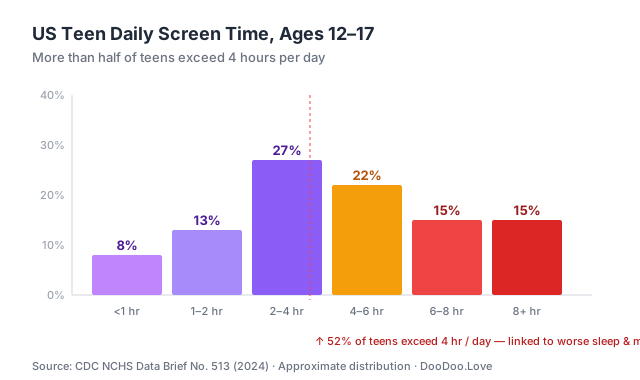 Source: CDC NCHS Data Brief No. 513 (2024). Distribution approximate.
Taken together, the picture is not "games are bad" or "games are great." It is that short, well-chosen breaks are compatible with learning, while extended passive screen time is not. This guide is organized around that distinction.
Short-break games vs. deep-play games: two different use cases
One of the most useful framings a student, teacher, or parent can adopt is to separate browser games into two categories:
| Category | Session length | Purpose | Examples | |---|---|---|---| | Short-break games | 3–10 minutes | Mental reset between tasks, transition between classes, end-of-assignment cooldown | 2048, Logic Vault, Find n Match, Tiles Matching | | Deep-play games | 30+ minutes | Entertainment during study hall, library free time, lunch, or after school | Tower Defense, Chess vs. AI, strategy and .io games |
Short-break games are the ones that belong in an academic context. They load in seconds, pause cleanly, and are designed around small rewarding loops that fit naturally into a 5-minute window between tasks. Deep-play games are valid and enjoyable, but they are less appropriate as a "quick break" because the natural session length is much longer than a break should be.
The rest of this guide splits the 15 recommended titles along that line.
Quick-play puzzle games (perfect for 5-minute breaks)
These load in under 3 seconds and can be paused instantly. They are the best candidates for structured study breaks during independent work or between homework problems at home. If you want a deeper bench of this type, our unblocked puzzle games shortlist is maintained year-round — and if your network allows the card-and-tile classics, the solitaire and mahjong shelves are the most teacher-tolerated games on the site.
1. 2048 (Bubble Merge Edition)
The classic number-merging puzzle that sparked a thousand imitators. Slide tiles to combine matching numbers and reach the 2048 tile. Each session can be 2 minutes or 30 minutes depending on how deep you go.
Why it works as a study break: No sound needed, no flashy animations, and a natural save state that lets you stop on a clean move. The gameplay is mathematical — pure base-2 arithmetic — so it doubles as light number practice.
Playing Bubble Merge 2048 for hours was a blast, my personal best score of 8192 still feels like an achievement. I found that focusing on creating a single high-value bubble and then merging it with others helps a lot. The game gets tough around level 10, where the bubble count increases drastically, making it hard to plan ahead. I struggled to get past this point, but with persistence, I managed to overcome the challenge and reach a higher score, making the experience even more satisfying.
2. Logic Vault
A rapid-fire logic trainer that rotates through seven small puzzle formats — closer to a workbook of brain teasers than a single game.
Why it works as a study break: Rounds are short and self-contained, and the constant format switching makes it a warm-up for analytical work rather than a pull away from it.
Logic Vault rotates through seven stated puzzle types — numeric sequences, deduction scenarios, simple matching, symbol count, odd one out, quick arithmetic, and character frequency. Each level switches the problem format, so progress rewards flexible reasoning over memorization. A practical habit: identify which puzzle type you are looking at before hunting for the answer.
3. Find n Match
A layered triple-matching puzzle: only the top pieces are selectable, so every clear is a small planning decision rather than a race to tap.
Find n Match limits clicks to surface items, so clearing its layered pyramids of icons takes planning rather than rapid tapping. Six themed environments run from Meadow to Festival, with a timer keeping gentle pressure on. Early matches can bury pieces you need later — prioritize clears that expose several new surface items at once.
4. Tiles Matching
Mahjong-style tile clearing crossed with match-3 recognition. More engaging than basic matching games, but still low-stakes enough to play during a break without derailing the rest of a study session.
Tiles Matching blends mahjong-style layouts with match-3 logic in a browser puzzle that needs no download. Difficulty rises level by level, and the best clears come from looking a few moves ahead — removing one set can open access to others, while a careless match narrows later choices. Completion is not guaranteed on a first attempt.
5. Draw Save Puzzles
A newer physics-puzzle where you draw lines to save a character from danger. One-handed play (just a mouse), and each level takes under a minute — the ideal "one level and back to work" structure.
After several hours of playing Draw Save Puzzles, my personal best score is 42 levels completed without a single Stickman casualty. I found that drawing gentle slopes helps guide Stickman to safety more effectively. The game's physics engine can be unforgiving, especially on level 27, where I encountered a challenging puzzle that required precise shape drawing to overcome. This level took me multiple attempts to beat, but the sense of accomplishment was rewarding.
Action and reflex games (for longer free periods and after-school)
These are better suited to study hall, library free time, lunch breaks, or at-home downtime than to in-class micro-breaks. They reward longer sessions and benefit from sustained focus. More of this genre lives on our unblocked arcade games page.
6. Slope (Car Gradient variant)
The infinity-tunnel ball-rolling game that became a classroom legend. This version controls a car instead of a ball — same rush, different physics.
Why it works in free periods: The game file is relatively small (~2 MB) so it loads even on shaky school Wi-Fi, and the failure state resets instantly so a 10-minute session produces many complete attempts. If driving is your lane, more picks are collected under unblocked racing games.
Playing Slope Car Gradient for hours was a wild ride, my personal best score is 857 meters. To avoid obstacles, I found that tapping the brake at the right moment helps new players. The game gets tough around the 500 meter mark, where the track starts to narrow and obstacles get closer together, I struggled to maintain speed without crashing. After some practice, my reflexes improved and I was able to beat my previous records, now I'm aiming for the 1000 meter mark.
7. The Maze
A neon maze-chase in the classic arcade mold — collect everything, dodge the pursuit, get to the exit. No download, no Flash.
Each level of The Maze asks you to grab all three Stars, sweep up pink energy nodes for score, and reach the green Exit Portal before the hunters close in. Every detour buys the chase more time to catch up, so the real decision is when to stop collecting and commit to the exit.
8. Brick Game Classic
Another "why would anyone block this?" pick — the falling-block puzzle every teacher remembers from a pocket handheld, rebuilt for the browser.
Brick Game Classic keeps the falling-block formula: rotate and position each piece, then clear filled lines before the board stacks up. The twist is that completed columns clear as well as rows, which rewards thinking vertically, and you can accelerate a block's descent once its orientation is set. The interface stays deliberately minimal.
9. Frozen Jump
A wall-to-wall hopper with instant restarts — the same "one more try" pull that made simple reflex games a hallway staple.
Frozen Jump is an endless wall-to-wall hopper: the character leaps from one vertical surface to another, and the run never ends by design, so lasting longer is the whole challenge. Gold collection and a leadership ranking give each attempt a target beyond survival. It is billed as hard to play — deliberate, well-timed jumps outlast frantic tapping.
Strategy and thinking games (for actual learning)
These are the games teachers often don't mind students playing — because they arguably count as brain training and align with the cognitive benefits described in the research on digital games and learning engagement.
10. Chess (Free)
Play against the AI or hot-seat with a friend. Chess is genuinely on most school whitelists because chess clubs exist, and it is one of the clearest examples of a game with transferable cognitive value — research consistently associates chess with gains in planning, pattern recognition, and working memory.
Playing Chess Free for hours on end, I managed to beat the AI on level 12 with a score of 23 moves. My key to success was controlling the center of the board, which I found that new players often neglect. On level 14, I encountered a tough challenge, but using the undo feature helped me experiment with different moves. I found that taking my time and planning ahead was crucial, especially when the AI started to put pressure on my position.
11. Tower Defense (Terrifying Zombies II)
Strategic placement games are sneaky-educational — resource management, spatial reasoning, planning ahead. The "terrifying zombies" framing is mild (cartoony, not scary).
Terrifying Zombies Tower Defense II had me hooked for hours, building defenses and shooting zombies for XP. My personal best score is 12,500 points on level 5. I found that placing towers near bottlenecks helps new players conserve resources. As I progressed, I encountered a tough challenge on level 7, where zombie speed increased significantly. To overcome this, I focused on upgrading my shotgun tower, which made a huge difference in taking down the faster zombies.
12. Correct Math
Timed mental arithmetic with three answer choices per problem. Genuinely useful as a warm-up before a math worksheet.
Why it works in an academic context: It's literally arithmetic drill. Quick sums and differences under a clock are exactly the kind of low-stakes practice that meta-analyses of game-based learning have associated with small but consistent improvements in engagement.
Correct Math shows three possible answers for every arithmetic problem and gives you a tight window to pick the right sum or difference. Question difficulty quietly adapts to your recent performance, so consistent focus matters as much as raw calculation speed. Keeping a steady answer rhythm — not rushing — is the reliable way to build a score.
13. Word Safari
A themed word search that doubles as vocabulary review. Harder than it looks once the easy horizontal finds are gone.
Word Safari hides vocabulary in a colorful letter grid — words can run forwards, backwards, or diagonally — across themed hunts including Animals, Food, Space, Ocean, and Jobs. The publisher notes support for six languages, and the format fits either a 2-minute break or a longer session. Scan the diagonals early; they hide the most.
14. Stickman Trivia Fall.io
Multi-category trivia with a competitive twist — up to four players race in the same arena. Good for group play during study hall.
Rapid-fire questions draw from hundreds of prompts across diverse categories, and Arena mode pits up to four players against each other to answer first. Wrong answers briefly slow your response timer, so hasty guessing compounds. Solo mode adds quest progression and boss battles, while weekly and monthly special quizzes rotate in fresh material.
Play Stickman Trivia Fall.io →
Social / multiplayer games (play with friends across classrooms)
15. Basketball.io
A top-down basketball .io arena — grab the ball, dribble, shoot before someone knocks it loose.
Basketball.io reduces the sport to its core loop of grab, dribble, shoot, and score, viewed top-down with pared-back controls. Possessions turn on spacing and timing: holding the ball, blocking a rival's path, or forcing an overcommitment can matter more than charging straight at the basket. Feints and sudden stops create the space to break through.
How to judge unblocked game websites (a 60-second checklist)
Most searches in this space are actually for unblocked game websites, not individual games — and that market is full of throwaway mirrors that die within a semester. Before trusting any site (including ours) with your break time, run this checklist:
- A real, boring domain. Sites named
unblocked-games-76-999.xyzare proxy mirrors by construction; filter vendors re-block them within days. A durable site runs on one stable domain. - HTML5 games served from a games CDN — not "download our launcher," not APK files, not rehosted builds of paid games. If a site offers pirated versions of commercial titles as "unblocked," it is a takedown away from disappearing with your bookmarks.
- No sign-up wall. A legitimate free games site does not need your email to start a puzzle.
- Tolerable ads. Banner ads keep free sites alive; full-screen redirect chains and fake download buttons are the mark of a site that does not expect you back.
- Signs of maintenance. Working thumbnails, a dated changelog or news page, and games that actually load are the difference between a curated catalog and an abandoned scrape.
For transparency, this is also the standard we hold DooDoo.Love to: one domain, HTML5-only titles from a licensed games CDN, no accounts, and an unblocked hub we maintain between quarterly guide updates. If we ever fail the checklist above, treat us with the same suspicion.
How to actually check whether a game loads on your school device
Before spending 5 minutes at the school computer lab only to see "blocked," a student can do a quick self-check:
- Check the domain. Games on DooDoo.Love load from
doodoo.love(our main domain) andhtml5.gamemonetize.com/html5.gamemonetize.co(our game CDN). If those load, the games on this list work. - Test during a free period, not during class. If a game turns out to be blocked, the right time to discover that is during an independent block, not during algebra.
- Respect the network policy. School content filters exist for real reasons — CIPA compliance, student safety, and bandwidth management. If a specific game is blocked on a specific network, it is blocked. This guide is not a workaround.
This article does not recommend using proxies, VPNs, or "school unblock" sites. They violate most Acceptable Use Policies, and getting caught typically results in the loss of device privileges — which is a worse outcome than simply saving a game for after school.
A healthier conversation: how teachers and parents can talk to students about game breaks
The framing of "games versus school" is often counterproductive. Students game in large numbers regardless of what adults prefer (see the 85% and 41% figures above), so the more useful conversation is about when and how long rather than whether.
Some concrete talking points that tend to work better than blanket rules:
- Anchor breaks to finished work, not timers. "Finish this worksheet, then take a 5-minute break" is easier to respect than "15 minutes of screen time per hour." It makes gaming a reward signal for completed work rather than a countdown to conflict.
- Name the category explicitly. Students respond well to the distinction between "quick-break game" and "deep-play game." Most of the friction around classroom gaming comes from deep-play sessions being attempted in break-sized windows.
- Focus on sleep, not minutes. The AAP's 2026 media guidance explicitly de-emphasizes daily screen-time caps and instead asks families to protect sleep, physical activity, and in-person time. A browser puzzle for 10 minutes after homework is a very different signal than 90 minutes of gaming at 11 p.m.
- Model the behavior. Adults who scroll phones through dinner and then enforce strict screen rules lose credibility quickly. Shared norms beat imposed ones.
For teachers, the most useful classroom move is often to define when game-breaks are acceptable (after an assignment is finished, during specified free time) and which games are not appropriate on school devices (anything violent, monetized through loot boxes, or designed for endless engagement). That explicit framing is more enforceable than a blanket "no games" rule that students will route around anyway.
Why this list stops at 15 games
We could pad this article to 100 games by throwing every title on our site into a table. But if you have read this far, you want games that actually load and are actually enjoyable in short sessions — not a giant list where 80% are forgettable.
The five returning picks — 2048, Draw Save Puzzles, Slope, Chess, and the Tower Defense entry — are backed by 25+ hours of combined play on Chromebook hardware. The ten titles added in the July 2026 refresh were screened against the same school-device criteria (HTML5-only, no install, no sign-up, classroom-appropriate themes); hands-on score runs and screenshots for them are scheduled for the next update. If there is a game you would like added, let us know.
Frequently Asked Questions
Are these games really unblocked at every school?
No. Every school's network is different. Some schools block browser games categorically — any domain with "games" in its name, regardless of content. This list focuses on HTML5 browser games that run on standard CDNs, which gives them a better chance of working, but no guarantee. If a specific school blocks these pages, that is the school's decision and students should respect it.
Do I need to sign up to play these?
No. All games on DooDoo.Love are free to play with no account required. Progress is saved locally in the browser, which means clearing cookies or switching computers resets it.
Can I play on a Chromebook?
Yes. All 15 games above are pure HTML5 browser games that work on ChromeOS. They don't require plugins, Flash (which Adobe ended support for in December 2020), or downloads.
Are these games safe for younger students?
The games above are all E-rated equivalent — no gore, no adult content, no explicit language. Games like Chess, Logic Vault, Word Safari, and 2048 are actively appropriate for elementary through high school. The Tower Defense title has cartoon zombies that may be on the edge for very young students — use judgment.
How much game time during school is actually reasonable?
There is no universal number, and the current AAP guidance deliberately avoids giving one. Practically, research on micro-breaks in classroom settings points toward 5–10 minute breaks a few times per study session as the range where short, restorative activities help sustain concentration. Longer gaming sessions fit better outside of instructional time.
Will my school's filter block DooDoo.Love over time?
Possibly. Content filters are updated weekly by vendors like Securly and GoGuardian. If this site is added to a blocklist, there is nothing on our end that can change that — it's their network. Bookmarking a few titles on a personal device is the simplest workaround for weekend or after-school play.
What to do next
- Bookmark this page to keep these 15 games handy for homework breaks.
- Browse the unblocked games hub — hand-picked arcade, puzzle, and racing shortlists that we keep current between guide updates.
- Try the Puzzle Games category for similar quick-play titles.
- Read our related guide: 50 Best Free Online Games in 2026 for a broader list not focused on school filters.
- Looking for class-adjacent content? Educational Games has around 100 titles specifically for learning.
Found a game that loads reliably on your school's network that we missed? Let us know — this list is updated quarterly.
Related guides
Keep reading — these pillars pair well with our school-safe picks:
- 50 Best Free Online Games in 2026 — Broader ranking, not restricted to school networks.
- Best 2-Player Browser Games in 2026 — Two-player picks you can share with a classmate.
- Games to Play When Bored at School — Another angle on school-appropriate gaming.
- .io Games Explained — Why .io titles tend to slip past filters.
About the author: DooDoo Editorial is DooDoo.Love's editorial desk. The returning picks in this guide carry hands-on play notes; titles added in the July 2026 refresh were screened against the guide's school-device criteria and are queued for hands-on verification in the next update.
Last updated: July 28, 2026 · Next scheduled update: October 2026